加班爸爸最近發現登入,忘了提交sitemap。
(然後事後又發現robots.txt也寫錯)
兩大失敗導致google索引一直失敗.....

這次加班爸爸藉助了chatGPT,搞清楚sitemap提交的流程。
最重要是先去到google search console的路徑下
https://search.google.com/search-console/about
1.登入Google Search Console
Sign in to Google Search Console: Go to the Google Search Console website (https://search.google.com/search-console/) and sign in using your Google account.
2.加入自己的網址
Add your website: If you haven't already added your website to Google Search Console, click on the "Add Property" button and enter your website's URL. Follow the verification process to prove that you own the website. There are several verification methods available, such as adding an HTML tag to your website's code, uploading an HTML file to your website's server, or using your Google Analytics account.
3.提交自己的sitemap (就是忘了這個)
Submit a sitemap: To help Google understand the structure of your website and index your pages more efficiently, submit a sitemap to Google Search Console. You can generate a sitemap using a sitemap generator tool or a plugin if you're using a content management system like WordPress. Once you have your sitemap XML file, submit it through the Sitemaps section in Google Search Console.
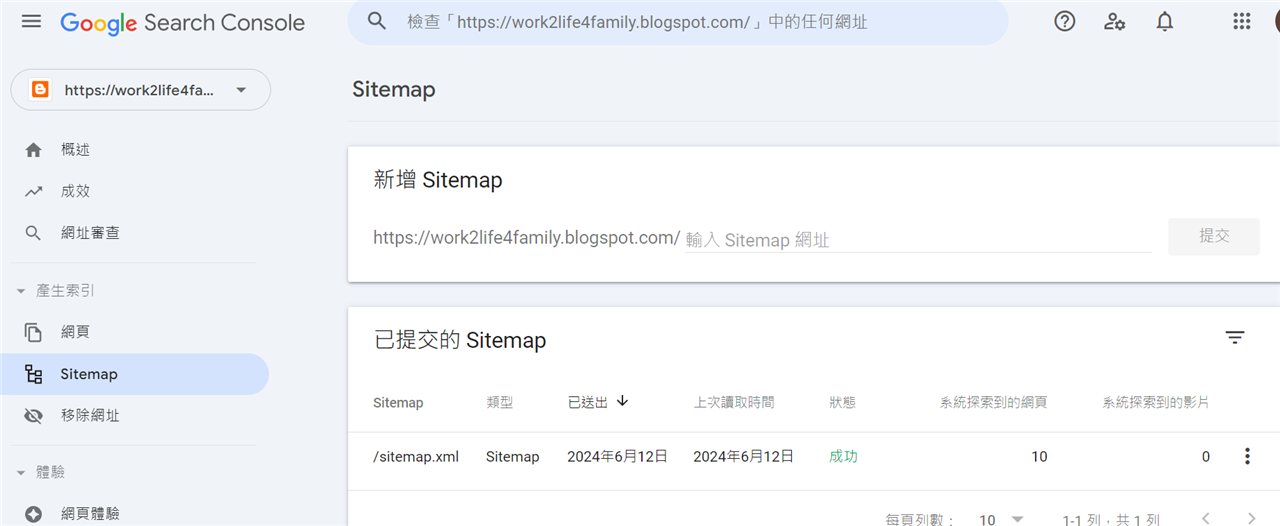
Blogger很貼心,會自動產生出sitemap檔案 -> sitemap.xml
其他網站可能要自己想辦法喔。
以這個網誌為例,會是
https://work2life4family.blogspot.com/sitemap.xml
點進去這個連結,就會跳出以下畫面

sitemap如字義,就是網站的地圖。
會整理網站中內部網頁內容,方便google搜尋引擎分析。
最後到Google Search Console裡面,點選左側Sitemap選項
新增提交sitemap.xml上去,這樣就能讓google搜尋引擎成功把網址編入拉~
想知道其他跟SEO相關的文章嗎?也可以參考下面的連結喔